---
title: Login
description: How to log in into Nextail platform?
---
[Skip to content](https://help.nextail.co/legals/login#main-content)
English
Show submenu for translations
[](https://help.nextail.co/legals?hsLang=en)
Open main navigation
Close main navigation
- English
Show submenu for translations
- [Contact us](https://nextail.co/contact)
[Contact us](https://nextail.co/contact)
How can we help you?
- There are no suggestions because the search field is empty.
1. [New customers - Legal](https://help.nextail.co/legals?hsLang=en)
2. [Account Help](https://help.nextail.co/legals/account-help?hsLang=en)
- [Account Help](https://help.nextail.co/legals/account-help?hsLang=en)
- [Service & Solution](https://help.nextail.co/legals/service-solution?hsLang=en#main-content)
- [Solution specifications](https://help.nextail.co/legals/service-solution?hsLang=en#solution-specifications)
- [Implementation process](https://help.nextail.co/legals/service-solution?hsLang=en#implementation-process)
- [Data requirements](https://help.nextail.co/legals/service-solution?hsLang=en#data-requirements)
- [Service Levels](https://help.nextail.co/legals/service-solution?hsLang=en#service-levels)
- [Support](https://help.nextail.co/legals/service-solution?hsLang=en#support)
- [Terms & Conditions](https://help.nextail.co/legals/terms-conditions?hsLang=en)
# Login
You can log in to your Nextail account by navigating to [https://clientname.nextail.co/admin/login](https://clientname.nextail.co/admin/login) in your browser. (We recommend Chrome or Safari for optimal experience).
When you first open your Nextail Page, a screen will appear and you will be prompted to:
**Log in:**
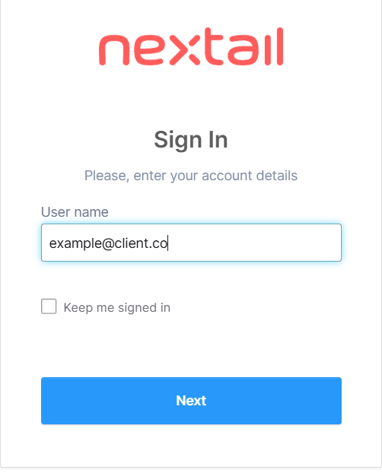
1. You will need to introduce your user email in the "**User name**" field and click **"Next"**
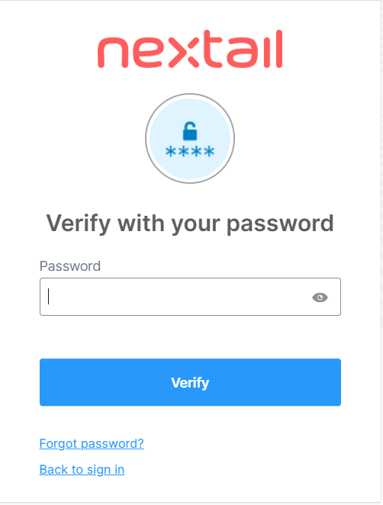
2. Put your password in the "**Password**" field.
3. Click the "**Verify**" button.
Learn more about how to Edit my profile and Reset password
[](https://nextail.co/)
c/Belalcázar 14, 28006 Madrid, Spain
Copyright © 2025, Nextail Labs SLU
