---
title: Minimum Display Quantities (MDQ)
description: Minimum display transversal
---
[Skip to content](https://help.nextail.co/en/minimum-displays-transversal#main-content)
[](https://help.nextail.co/legals?hsLang=en)
Open main navigation
Close main navigation
- [Contact us](https://nextail.co/contact)
[Contact us](https://nextail.co/contact)
How can we help you?
- There are no suggestions because the search field is empty.
1. [Knowledge Base](https://help.nextail.co/en?hsLang=en)
2. [Transversal](https://help.nextail.co/en/transversal?hsLang=en)
3. [Optimization](https://help.nextail.co/en/transversal?hsLang=en#optimization)
# Minimum Display Quantities (MDQ)
In modern retail, maintaining optimal stock levels is crucial for meeting customer demand while managing inventory efficiently. The Minimum Display Quantities feature, designed to ensure a minimum quantity of products is available in stores, thus enhancing customer experience and maximizing sales.
### **What are the Minimum Display Quantities?**
Minimum Display Quantities is the configuration of a **minimum number of units per product size and store location**. This threshold is crucial for replenishing or allocating stock based on the algorithms used by Nextail. This parameter is set at SKU/store level, ensuring that a baseline quantity of each product is consistently available to customers.
During the onboarding phase, you will be able to decide whether to set MDQ at the **beginning or end of the planning horizon**. This means the quantity you set will either represent the minimum number of units you want in your store inventory at the end of the planning horizon or include the demand forecast for the planning period. As a best practice, we suggest setting this at the end of the planning horizon in order to avoid overstocking your stores and generating high coverages.
#### **Conditional vs. Mandatory MDQ**
Nextail differentiates between two types of Minimum Display Quantities:
**Conditional (Force = False)**: The algorithm considers other factors, such as demand and warehouse scarcity, to determine whether maintaining the minimum is beneficial. If product scarcity is detected at the distribution center, the system might not fulfill the minimum requirement if it is not deemed worthwhile.
Nextail’s algorithm is assessing **whether it is worth fulfilling the MDQ requirements for each SKU**. When a product begins to experience stock scarcity at the distribution center, the system evaluates if meeting the predefined minimum level is optimal.
For instance, if a SKU’s minimum configuration for a store is set to 5 units, Nextail’s algorithm may decide to send fewer units (4, 3, 2, 1, or even none!) based on factors like forecasted demand, current scarcity at the warehouse and sales thresholds.
**Mandatory (Force = True):** In this case, the system will always fulfill the minimum quantity configured, regardless of other variables like demand forecast or stock scarcity at the DC. The focus is on maintaining this threshold without exception. Nextail does not use any algorithmic evaluation for minimum coverage. As long as there is stock available in the warehouse, the system will always fulfill the configured minimum quantity. This approach disregards demand forecasts or stock scarcity at the warehouse and simply ensures that the set minimum quantity is met.
#### **Priority in Case of Warehouse Scarcity with Multiple Mandatory MDQ**
When warehouse stock is limited and there are more Mandatory MDQ requests than available inventory, the system prioritizes fulfilling Mandatory MDQ with the highest demand. This ensures that high-demand SKUs receive stock first, maximizing availability for items with greater sales potential.
#### **How the System Works**
Forecast and Threshold: The system first analyzes the demand forecast and sets a sales threshold for each product.
Stock Availability: Based on stock availability at the warehouse, the system either fulfills the Minimum Display Quantities or adjusts it accordingly. If there is enough stock, the minimum quantity is replenished without consideration of demand. However, if stock is scarce, the algorithm will determine if fulfilling the MDQ is still necessary based on forecasted demand.
Global Optimization: The system also uses global optimization strategies to ensure that Minimum Display Quantities are maintained where they add the most value, balancing stock levels across different locations.
#### **Importance of Minimum Display Quantities**
Minimum Display Quantities keep key products in stores, reducing the chance of stockouts and lost sales. Mandatory Minimum Display Quantities are especially useful for popular or promotional products that need visibility.
#### **How to upload the Minimum Display Quantities in the platform?**
To upload MDQ, update the template with the following headers:
- **SKU Ref** and **StoreCode**: SKU and store codes for minimum display application.
- **Desired\_Min**: The minimum quantity of units desired.
- **Force**: Set to 1 for Hard Minimum or 0 for Soft Minimum.

**Note**: All the templates are also available to download under Knowledge Base \> Templates.
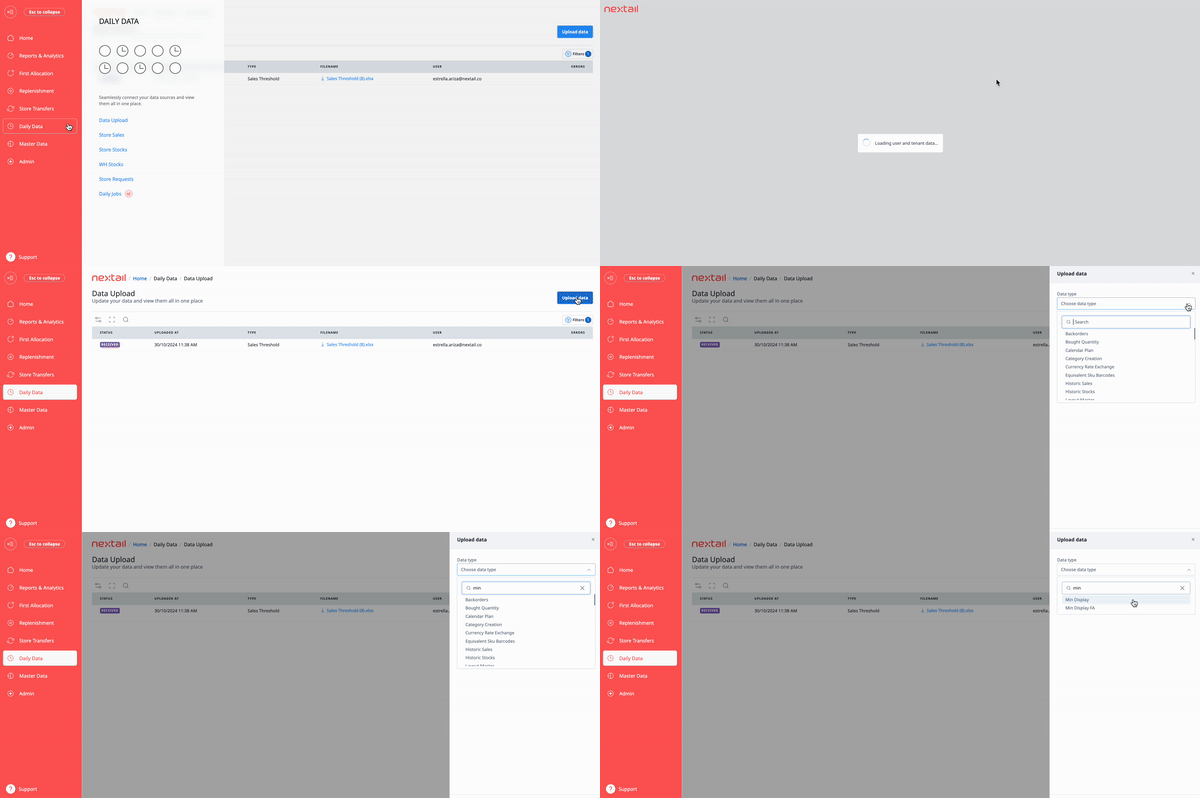
Then, go to **Daily Data \> Data Upload** and select **Min Display for replenishment** or **Min Display FA** for first allocation.
#### You can now Edit and Delete Minimum Display Quantities on-screen with Minimum Display page
Go to Master Data \> Minimum Displays \> Select product to Edit or Delete and click on respective button
Please make sure to use available Filters for your convenience.

When editing MDQ you will see the option to add/remove units and select Compliance: Mandatory or Conditional:
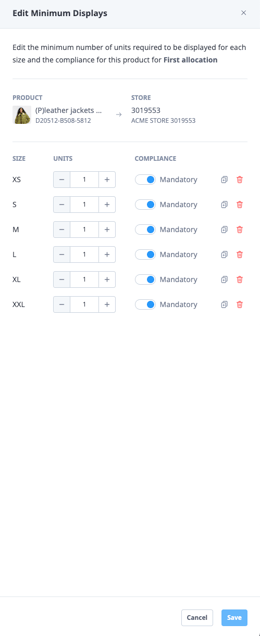
Make sure to click Save once all necessary changes are complete.
### **How to delete Minimum Displays via Data Upload?\***
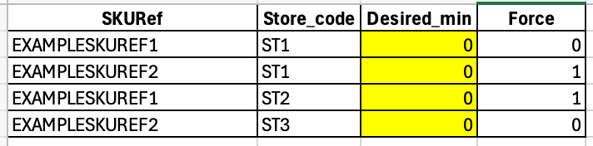
In order to delete Minimum Displays you just need to upload a file with 0 values for Desired\_min.
For example:
Here are the steps:
1. Prepare the file with combinations you wish to remove minimum display from. You can find template for the file [here](https://help.nextail.co/en/data-upload-templates?hsLang=en).
2. Set Desired\_min quantity as 0
3. Open “Daily Data” tab and select “Data Upload”
4. Click on "Upload data" button and select your Data type and prepared file
###### **\**Bulk deletion via file upload is not available for a limited number of users still on legacy processing systems. Contact Nextail Support if records are not removed as expected — they will confirm your setup and provide assisted removal.***
### **In Summary**
Nextail’s Minimum Display Quantities feature offers a flexible, intelligent solution to keep stores stocked while maximizing inventory efficiency. By balancing demand, stock levels, and other key factors, retailers can optimize product availability, meeting customer needs while minimizing stockouts.
- [First Allocation](https://help.nextail.co/en/first-allocation?hsLang=en#main-content)
- [Introduction](https://help.nextail.co/en/first-allocation?hsLang=en#introduction)
- [Demand Forecast Logic - First Allocation](https://help.nextail.co/en/first-allocation?hsLang=en#demand-forecast-logic-first-allocation)
- [Optimization Logic - First Allocation](https://help.nextail.co/en/first-allocation?hsLang=en#optimization-logic-first-allocation)
- [Launching a Scenario](https://help.nextail.co/en/first-allocation?hsLang=en#launching-a-scenario)
- [Reviewing a Scenario](https://help.nextail.co/en/first-allocation?hsLang=en#reviewing-a-scenario)
- [Replenishment](https://help.nextail.co/en/replenishment?hsLang=en#main-content)
- [Introduction](https://help.nextail.co/en/replenishment?hsLang=en#introduction)
- [Demand Forecast logic](https://help.nextail.co/en/replenishment?hsLang=en#demand-forecast-logic)
- [Optimization logic](https://help.nextail.co/en/replenishment?hsLang=en#optimization-logic)
- [Launching a Scenario](https://help.nextail.co/en/replenishment?hsLang=en#launching-a-scenario)
- [Reviewing a Scenario](https://help.nextail.co/en/replenishment?hsLang=en#reviewing-a-scenario)
- [FAQs](https://help.nextail.co/en/replenishment?hsLang=en#faqs)
- [Store Transfers](https://help.nextail.co/en/store-transfers?hsLang=en#main-content)
- [Introduction](https://help.nextail.co/en/store-transfers?hsLang=en#introduction)
- [Demand Forecast logic](https://help.nextail.co/en/store-transfers?hsLang=en#demand-forecast-logic)
- [Optimization logic](https://help.nextail.co/en/store-transfers?hsLang=en#optimization-logic)
- [Launching a Scenario](https://help.nextail.co/en/store-transfers?hsLang=en#launching-a-scenario)
- [Reviewing a Scenario](https://help.nextail.co/en/store-transfers?hsLang=en#reviewing-a-scenario)
- [FAQs](https://help.nextail.co/en/store-transfers?hsLang=en#faqs)
- [Master Data & Daily Data](https://help.nextail.co/en/master-data-daily-data?hsLang=en#main-content)
- [FAQs](https://help.nextail.co/en/master-data-daily-data?hsLang=en#faqs)
- [Daily Data](https://help.nextail.co/en/master-data-daily-data?hsLang=en#daily-data)
- [Business Intelligence](https://help.nextail.co/en/business-intelligence?hsLang=en#main-content)
- [Dashboards](https://help.nextail.co/en/business-intelligence?hsLang=en#dashboards)
- [Relevant Metrics](https://help.nextail.co/en/business-intelligence?hsLang=en#relevant-metrics)
- [FAQs](https://help.nextail.co/en/business-intelligence?hsLang=en#faqs)
- [Transversal](https://help.nextail.co/en/transversal?hsLang=en#main-content)
- [Demand Forecast](https://help.nextail.co/en/transversal?hsLang=en#demand-forecast)
- [Optimization](https://help.nextail.co/en/transversal?hsLang=en#optimization)
- [Categories](https://help.nextail.co/en/transversal?hsLang=en#categories)
- [Mobile App](https://help.nextail.co/en/mobile-app?hsLang=en#main-content)
- [Introduction](https://help.nextail.co/en/mobile-app?hsLang=en#introduction)
- [Functionalities](https://help.nextail.co/en/mobile-app?hsLang=en#functionalities)
- [FAQs](https://help.nextail.co/en/mobile-app?hsLang=en#faqs)
- [Account Help](https://help.nextail.co/en/account-help?hsLang=en)
- [Service & Solution](https://help.nextail.co/en/service-solution?hsLang=en#main-content)
- [Solution specifications](https://help.nextail.co/en/service-solution?hsLang=en#solution-specifications)
- [Implementation process](https://help.nextail.co/en/service-solution?hsLang=en#implementation-process)
- [Data requirements](https://help.nextail.co/en/service-solution?hsLang=en#data-requirements)
- [Service Levels](https://help.nextail.co/en/service-solution?hsLang=en#service-levels)
- [Support](https://help.nextail.co/en/service-solution?hsLang=en#support)
- [Terms & Conditions](https://help.nextail.co/en/terms-conditions?hsLang=en)
[](https://nextail.co/)
c/Belalcázar 14, 28006 Madrid, Spain
Copyright © 2025, Nextail Labs SLU