---
title: How can I block or unblock products?
description: How can I block or unblock products?
---
[Skip to content](https://help.nextail.co/en/how-can-i-block-or-unblock-products#main-content)
[](https://help.nextail.co/legals?hsLang=en)
Open main navigation
Close main navigation
- [Contact us](https://nextail.co/contact)
[Contact us](https://nextail.co/contact)
How can we help you?
- There are no suggestions because the search field is empty.
1. [Knowledge Base](https://help.nextail.co/en?hsLang=en)
2. [Master Data & Daily Data](https://help.nextail.co/en/master-data-daily-data?hsLang=en)
3. [FAQs](https://help.nextail.co/en/master-data-daily-data?hsLang=en#faqs)
# How can I block or unblock products?
## You can prevent certain products from being sent to stores from "Master Data → Visual Merchandiser", either on-screen or in bulk with Data Import.
#### **Visual Merchandiser**
- Go to the “Master Data" menu and select "Visual Merchandiser”.
- Tick the products to be blocked from being sent to a given store, and save the changes by pressing the “Block” button.
- You can also unblock previously blocked products by ticking them and pressing the “Unblock” button.
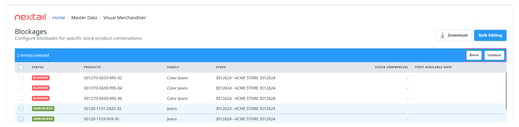
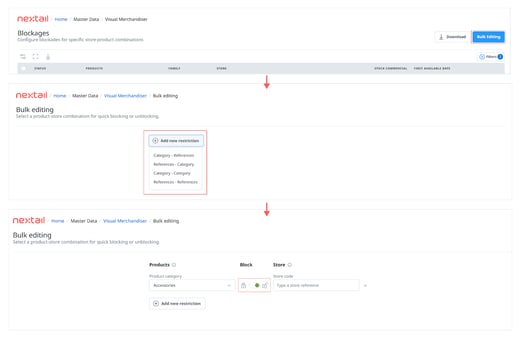
If you need to block/unblock a number of products, use the **“Bulk Editing”** option.
- Click the "Bulk Editing".
- Select the option that meets the restriction, i.e.: Block a specific product category and even within a certain store category (categories already created).
- Once the desired group of products and/or stores has been selected, select block/unblock option. You can also add new restrictions later.
#### 
#### **Bulk updates via Data Import**
To block or unblock many product-store combinations at once:
1. Go to "Master Data → Visual Merchandiser" and click Data Import.
2. Use the Module selector to choose where the block applies: First Allocation, Replenishment & Store Transfer, or Transversal.
3. Download the template. Each line refers to a product-store combination: set 1 to unblock (allocate/replenish) or 0 to block.
4. Save the file as CSV and drag and drop it into the Data Import panel.
The previous Layout Master and Layout Master FA templates have been replaced by this single Layouts template. Column names may differ from the previous templates; always follow the template and instructions in the Data Import panel. For the full step-by-step guide, see [On-site Data Imports & Import History](https://help.nextail.co/en/on-site-data-imports-import-history?hsLang=en).
#### **Blocks per size**
This is an optional functionality, so first, you need to ask Nextail support to activate it through a ticket.
Once activated, size-level blocks are also managed with the Layouts template in "Master Data → Visual Merchandiser" → Data Import. They replace the previous SKU Store Blocks upload. Follow the template and instructions in the Data Import panel to identify each size.
Note: These blocks are not currently visible in the platform.
- [First Allocation](https://help.nextail.co/en/first-allocation?hsLang=en#main-content)
- [Introduction](https://help.nextail.co/en/first-allocation?hsLang=en#introduction)
- [Demand Forecast Logic - First Allocation](https://help.nextail.co/en/first-allocation?hsLang=en#demand-forecast-logic-first-allocation)
- [Optimization Logic - First Allocation](https://help.nextail.co/en/first-allocation?hsLang=en#optimization-logic-first-allocation)
- [Launching a Scenario](https://help.nextail.co/en/first-allocation?hsLang=en#launching-a-scenario)
- [Reviewing a Scenario](https://help.nextail.co/en/first-allocation?hsLang=en#reviewing-a-scenario)
- [Replenishment](https://help.nextail.co/en/replenishment?hsLang=en#main-content)
- [Introduction](https://help.nextail.co/en/replenishment?hsLang=en#introduction)
- [Demand Forecast logic](https://help.nextail.co/en/replenishment?hsLang=en#demand-forecast-logic)
- [Optimization logic](https://help.nextail.co/en/replenishment?hsLang=en#optimization-logic)
- [Launching a Scenario](https://help.nextail.co/en/replenishment?hsLang=en#launching-a-scenario)
- [Reviewing a Scenario](https://help.nextail.co/en/replenishment?hsLang=en#reviewing-a-scenario)
- [Scheduled Runs](https://help.nextail.co/en/replenishment?hsLang=en#scheduled-runs)
- [FAQs](https://help.nextail.co/en/replenishment?hsLang=en#faqs)
- [Store Transfers](https://help.nextail.co/en/store-transfers?hsLang=en#main-content)
- [Introduction](https://help.nextail.co/en/store-transfers?hsLang=en#introduction)
- [Demand Forecast logic](https://help.nextail.co/en/store-transfers?hsLang=en#demand-forecast-logic)
- [Optimization logic](https://help.nextail.co/en/store-transfers?hsLang=en#optimization-logic)
- [Launching a Scenario](https://help.nextail.co/en/store-transfers?hsLang=en#launching-a-scenario)
- [Reviewing a Scenario](https://help.nextail.co/en/store-transfers?hsLang=en#reviewing-a-scenario)
- [FAQs](https://help.nextail.co/en/store-transfers?hsLang=en#faqs)
- [Master Data & Daily Data](https://help.nextail.co/en/master-data-daily-data?hsLang=en#main-content)
- [FAQs](https://help.nextail.co/en/master-data-daily-data?hsLang=en#faqs)
- [Master Data](https://help.nextail.co/en/master-data-daily-data?hsLang=en#master-data)
- [Daily Data](https://help.nextail.co/en/master-data-daily-data?hsLang=en#daily-data)
- [Admin](https://help.nextail.co/en/admin?hsLang=en#main-content)
- [DIO Schedule](https://help.nextail.co/en/admin?hsLang=en#dio-schedule)
- [DIO Monitor](https://help.nextail.co/en/admin?hsLang=en#dio-monitor)
- [Business Intelligence](https://help.nextail.co/en/business-intelligence?hsLang=en#main-content)
- [Dashboards](https://help.nextail.co/en/business-intelligence?hsLang=en#dashboards)
- [Relevant Metrics](https://help.nextail.co/en/business-intelligence?hsLang=en#relevant-metrics)
- [FAQs](https://help.nextail.co/en/business-intelligence?hsLang=en#faqs)
- [Transversal](https://help.nextail.co/en/transversal?hsLang=en#main-content)
- [Glossary: previous and new terminology](https://help.nextail.co/en/transversal?hsLang=en#glossary-previous-and-new-terminology)
- [Demand Forecast](https://help.nextail.co/en/transversal?hsLang=en#demand-forecast)
- [Optimization](https://help.nextail.co/en/transversal?hsLang=en#optimization)
- [Categories](https://help.nextail.co/en/transversal?hsLang=en#categories)
- [Mobile App](https://help.nextail.co/en/mobile-app?hsLang=en#main-content)
- [Introduction](https://help.nextail.co/en/mobile-app?hsLang=en#introduction)
- [Functionalities](https://help.nextail.co/en/mobile-app?hsLang=en#functionalities)
- [FAQs](https://help.nextail.co/en/mobile-app?hsLang=en#faqs)
- [Account Help](https://help.nextail.co/en/account-help?hsLang=en)
- [Service & Solution](https://help.nextail.co/en/service-solution?hsLang=en#main-content)
- [Solution specifications](https://help.nextail.co/en/service-solution?hsLang=en#solution-specifications)
- [Implementation process](https://help.nextail.co/en/service-solution?hsLang=en#implementation-process)
- [Data requirements](https://help.nextail.co/en/service-solution?hsLang=en#data-requirements)
- [Support](https://help.nextail.co/en/service-solution?hsLang=en#support)
- [Legal & Compliance](https://help.nextail.co/en/legal-compliance?hsLang=en#main-content)
- [Terms and Conditions](https://help.nextail.co/en/legal-compliance?hsLang=en#terms-and-conditions)
- [Service Level Agreement](https://help.nextail.co/en/legal-compliance?hsLang=en#service-level-agreement)
- [Data Processing Agreement](https://help.nextail.co/en/legal-compliance?hsLang=en#data-processing-agreement)
- [Previous versions](https://help.nextail.co/en/legal-compliance?hsLang=en#previous-versions)
[](https://nextail.co/)
c/Belalcázar 14, 28006 Madrid, Spain
Copyright © 2025, Nextail Labs SLU