---
title: How can I block or unblock products?
description: How can I block or unblock products?
---
[Skip to content](https://help.nextail.co/en/how-can-i-block-or-unblock-products#main-content)
[](https://help.nextail.co/legals?hsLang=en)
Open main navigation
Close main navigation
- [Contact us](https://nextail.co/contact)
[Contact us](https://nextail.co/contact)
How can we help you?
- There are no suggestions because the search field is empty.
1. [Knowledge Base](https://help.nextail.co/en?hsLang=en)
2. [Master Data & Daily Data](https://help.nextail.co/en/master-data-daily-data?hsLang=en)
3. [FAQs](https://help.nextail.co/en/master-data-daily-data?hsLang=en#faqs)
# How can I block or unblock products?
## You can prevent certain products from being sent to stores through the "Visual Merchandiser" option available in Master Data Menu or "Data upload" in Daily Data Menu.
#### **Visual Merchandiser**
- Go to the “Master Data" menu and select "Visual Merchandiser”.
- Tick the products to be blocked from being sent to a given store, and save the changes by pressing the “Block” button.
- You can also unblock previously blocked products by ticking them and pressing the “Unblock” button.
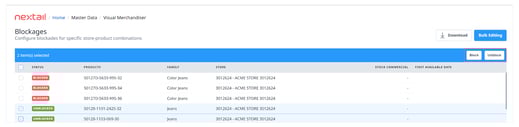
If you need to block/unblock a number of products, use the **“Bulk Editing”** option.
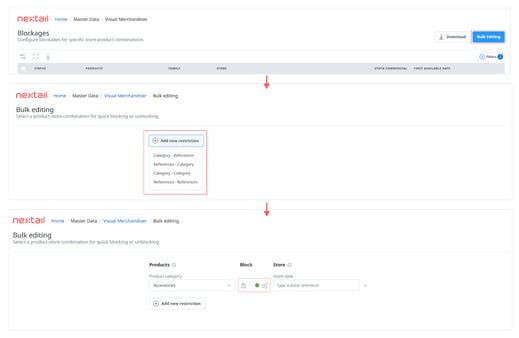
- Click the "Bulk Editing".
- Select the option that meets the restriction, i.e.: Block a specific product category and even within a certain store category (categories already created).
- Once the desired group of products and/or stores has been selected, select block/unblock option. You can also add new restrictions later.
#### 
#### **Data Upload**
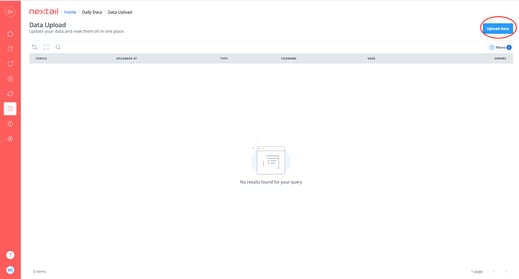
- Go to the “Daily Data" menu and select "Data Upload”.
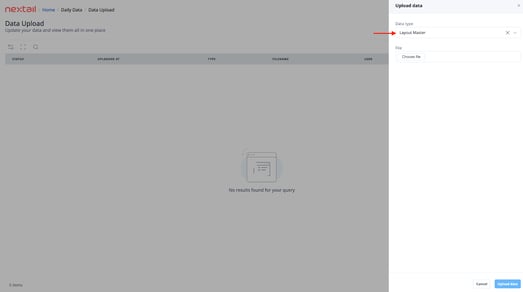
- In Data type, select "Layout Master" or "Layout Master FA". This option lets you upload the store layouts and block/unblock products in Replenishments and Store Transfers or First Allocation module.
- The file must contain 4 columns, named exactly as in the picture below so each line allows you to refer to a product-store combination:
**ProductRef**: This is the product reference.
**StoreCode:** The code store.
**Replenishment or Replenishment\_FA:** These columns should contain:
"1” if we want to restore /allocate
“0” if we want to block
#### **Blocks per size**
This is an optional functionality, so first, you need to ask Nextail support to activate it through a ticket.
To configure them, you will need to upload a file through the Data upload page
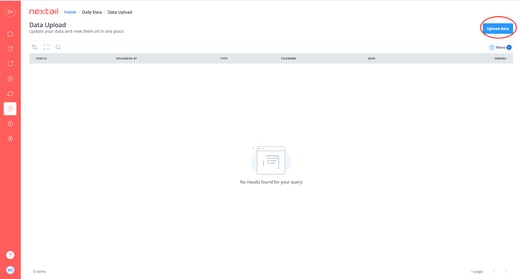
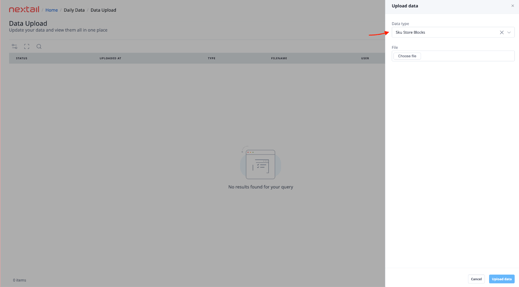
The file must contain the following columns
- SKURef
- StoreCode
- Replenishment: 1 is non blocked, 0 is blocked
Note: These blocks are not currently visible in the platform.
- [First Allocation](https://help.nextail.co/en/first-allocation?hsLang=en#main-content)
- [Introduction](https://help.nextail.co/en/first-allocation?hsLang=en#introduction)
- [Demand Forecast Logic - First Allocation](https://help.nextail.co/en/first-allocation?hsLang=en#demand-forecast-logic-first-allocation)
- [Optimization Logic - First Allocation](https://help.nextail.co/en/first-allocation?hsLang=en#optimization-logic-first-allocation)
- [Launching a Scenario](https://help.nextail.co/en/first-allocation?hsLang=en#launching-a-scenario)
- [Reviewing a Scenario](https://help.nextail.co/en/first-allocation?hsLang=en#reviewing-a-scenario)
- [Replenishment](https://help.nextail.co/en/replenishment?hsLang=en#main-content)
- [Introduction](https://help.nextail.co/en/replenishment?hsLang=en#introduction)
- [Demand Forecast logic](https://help.nextail.co/en/replenishment?hsLang=en#demand-forecast-logic)
- [Optimization logic](https://help.nextail.co/en/replenishment?hsLang=en#optimization-logic)
- [Launching a Scenario](https://help.nextail.co/en/replenishment?hsLang=en#launching-a-scenario)
- [Reviewing a Scenario](https://help.nextail.co/en/replenishment?hsLang=en#reviewing-a-scenario)
- [FAQs](https://help.nextail.co/en/replenishment?hsLang=en#faqs)
- [Store Transfers](https://help.nextail.co/en/store-transfers?hsLang=en#main-content)
- [Introduction](https://help.nextail.co/en/store-transfers?hsLang=en#introduction)
- [Demand Forecast logic](https://help.nextail.co/en/store-transfers?hsLang=en#demand-forecast-logic)
- [Optimization logic](https://help.nextail.co/en/store-transfers?hsLang=en#optimization-logic)
- [Launching a Scenario](https://help.nextail.co/en/store-transfers?hsLang=en#launching-a-scenario)
- [Reviewing a Scenario](https://help.nextail.co/en/store-transfers?hsLang=en#reviewing-a-scenario)
- [FAQs](https://help.nextail.co/en/store-transfers?hsLang=en#faqs)
- [Master Data & Daily Data](https://help.nextail.co/en/master-data-daily-data?hsLang=en#main-content)
- [FAQs](https://help.nextail.co/en/master-data-daily-data?hsLang=en#faqs)
- [Daily Data](https://help.nextail.co/en/master-data-daily-data?hsLang=en#daily-data)
- [Business Intelligence](https://help.nextail.co/en/business-intelligence?hsLang=en#main-content)
- [Dashboards](https://help.nextail.co/en/business-intelligence?hsLang=en#dashboards)
- [Relevant Metrics](https://help.nextail.co/en/business-intelligence?hsLang=en#relevant-metrics)
- [FAQs](https://help.nextail.co/en/business-intelligence?hsLang=en#faqs)
- [Transversal](https://help.nextail.co/en/transversal?hsLang=en#main-content)
- [Demand Forecast](https://help.nextail.co/en/transversal?hsLang=en#demand-forecast)
- [Optimization](https://help.nextail.co/en/transversal?hsLang=en#optimization)
- [Categories](https://help.nextail.co/en/transversal?hsLang=en#categories)
- [Mobile App](https://help.nextail.co/en/mobile-app?hsLang=en#main-content)
- [Introduction](https://help.nextail.co/en/mobile-app?hsLang=en#introduction)
- [Functionalities](https://help.nextail.co/en/mobile-app?hsLang=en#functionalities)
- [FAQs](https://help.nextail.co/en/mobile-app?hsLang=en#faqs)
- [Account Help](https://help.nextail.co/en/account-help?hsLang=en)
- [Service & Solution](https://help.nextail.co/en/service-solution?hsLang=en#main-content)
- [Solution specifications](https://help.nextail.co/en/service-solution?hsLang=en#solution-specifications)
- [Implementation process](https://help.nextail.co/en/service-solution?hsLang=en#implementation-process)
- [Data requirements](https://help.nextail.co/en/service-solution?hsLang=en#data-requirements)
- [Service Levels](https://help.nextail.co/en/service-solution?hsLang=en#service-levels)
- [Support](https://help.nextail.co/en/service-solution?hsLang=en#support)
- [Terms & Conditions](https://help.nextail.co/en/terms-conditions?hsLang=en)
[](https://nextail.co/)
c/Belalcázar 14, 28006 Madrid, Spain
Copyright © 2025, Nextail Labs SLU