
Since September 2026, you can see how your automated replenishment setup is configured and how it runs each day, directly from the Admin menu in Nextail.
- DIO Schedule: what is configured and when it runs. ( view-only )
DIO stands for Data Ingestion & Orchestration. It loads your data into Nextail and launches your Scheduled Runs (automated replenishment executions) at the right time.
Note: Until 29-09-2026, DIO was called Data Ingestion & Optimization. The new name better reflects what it does: it orchestrates your data updates and Scheduled Runs; it does not optimize replenishment.
DIO Schedule
DIO Schedule shows how your Data Ingestion & Orchestration is configured. Use it to check what is set up and when it runs.
On this page you can see:
- The full list of configured DIOs and their status.
- The data ingestion schedule.
- The automated replenishment run schedule and its delivery configuration.
Click a DIO in the list to open its details page and review its full configuration.
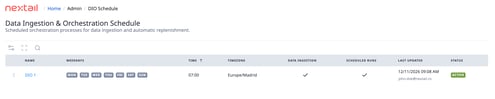
Note: DIO Schedule is view-only. If you need a change, contact your Nextail team. You can share exactly what you see on the page so we have the full context of your request.
How to access DIO Schedule:- Log in to your Nextail account.
- Open the "Admin" menu.
- Click "DIO Schedule" to review your configuration.
Note: The "Admin" menu is only available for accounts on the DIO architecture. If your account still runs on the legacy Daily architecture, you won't see it until your account is migrated. Contact your Nextail team to confirm your migration date.
FAQs
Can I edit my DIO configuration?
No. DIO Schedule and DIO Monitor are view-only. To request a change, contact your Nextail team.
What is the difference between DIO Schedule and DIO Monitor?
DIO Schedule shows what is configured and when it should run. DIO Monitor shows what actually happened today and in the last 10 days.
